
功能介绍
恋爱块是 Handsome 主题侧边栏中的一个温馨小组件,用于展示情侣之间的相处时间。它包含两个头像、一个跳动的心形图标,以及实时更新的相处时长计时器。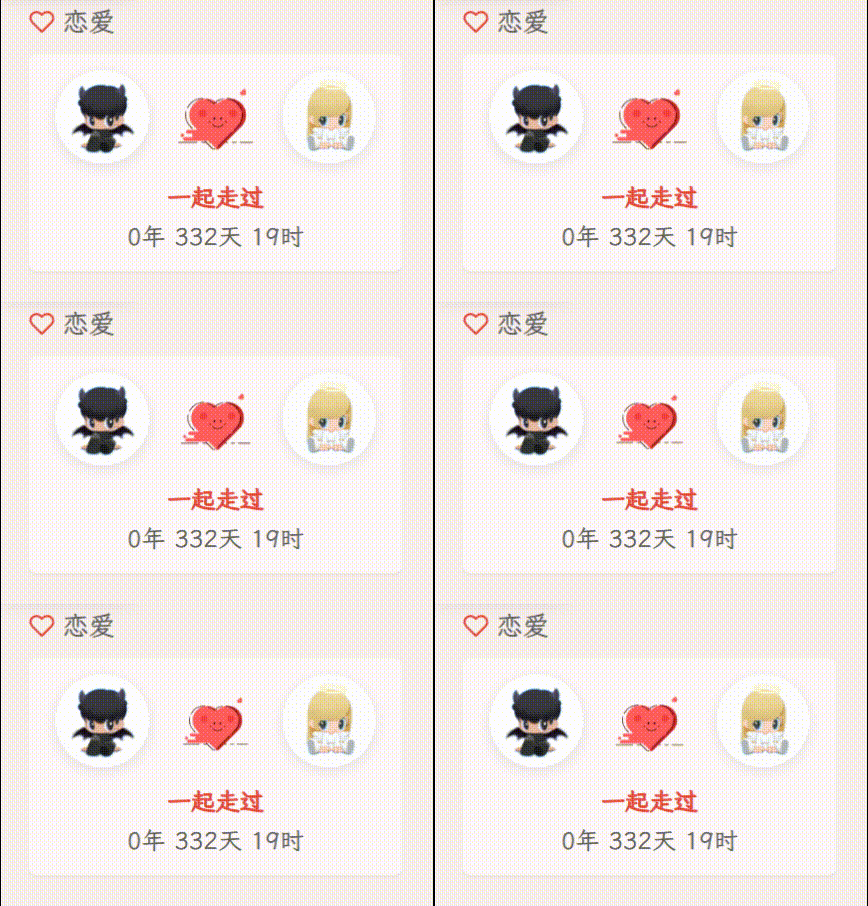
组件位置
文件路径:/usr/themes/handsome/component/sidebar.php,放在sidebar块中,广告位置之前。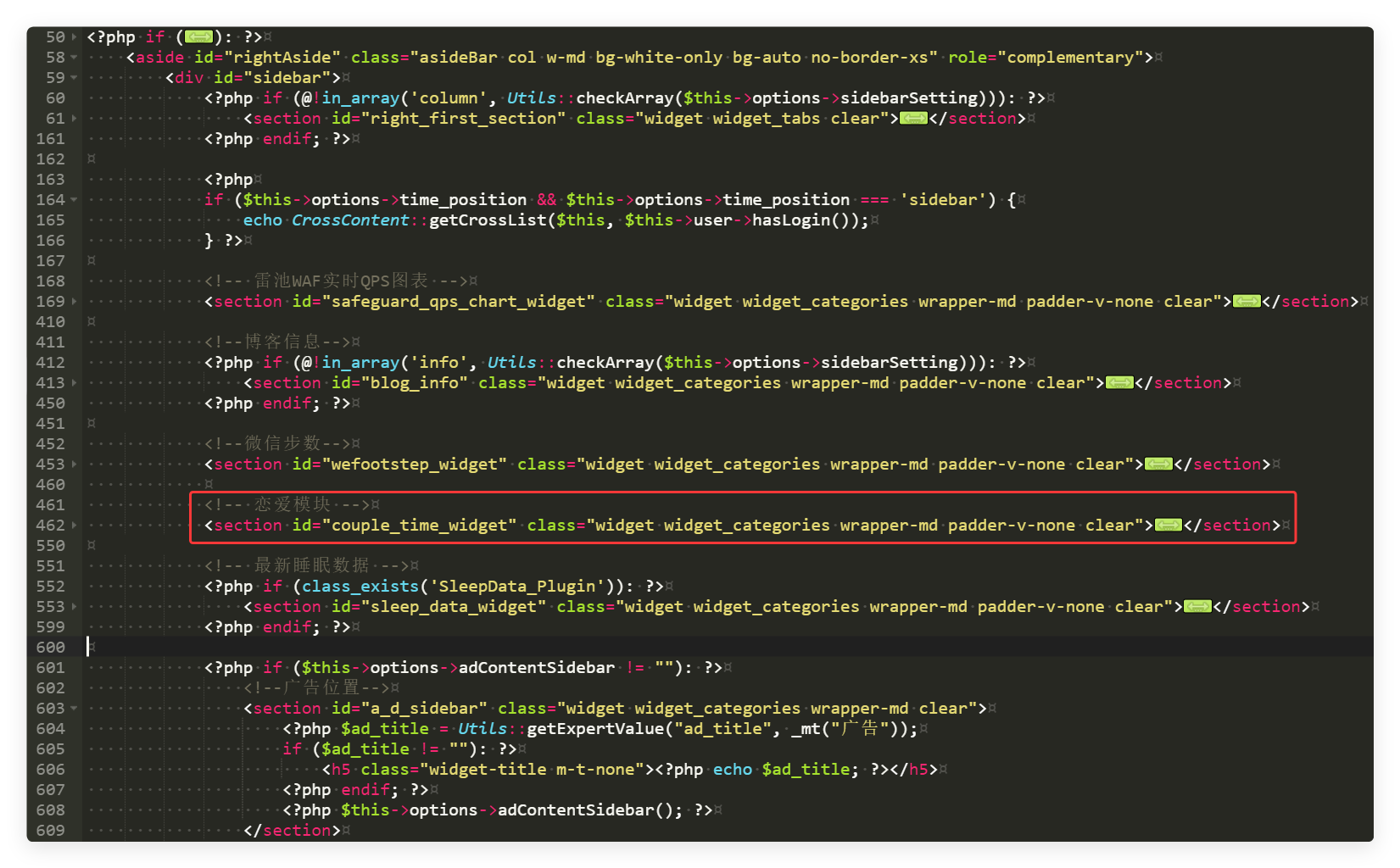
参数修改方法
1. 修改头像
位置:找到以下两行代码
<!-- 第一个头像 -->
<img src="https://q2.qlogo.cn/g?b=qq&nk=676567473&s=640" ...>

<!-- 第二个头像 -->
<img src="https://q2.qlogo.cn/g?b=qq&nk=2268697328&s=640" ...>修改方法:将 nk= 后面的数字替换为你们的 QQ 号码
获取 QQ 头像 URL 的方法:
- 打开
https://q2.qlogo.cn/g?b=qq&nk=你的QQ号&s=640 - 将
你的QQ号替换为实际的 QQ 号码 s=640表示头像大小为 640×640 像素
2. 修改初始时间
位置:找到以下代码行
var create_time = Math.round(new Date(Date.UTC(2025, 03, 17, 0, 0, 0)).getTime() / 1000);参数说明:
| 参数 | 含义 | 范围 |
|---|---|---|
| 2025 | 年份 | 任意年份 |
| 03 | 月份 | 0-11(0=1月, 11=12月) |
| 17 | 日期 | 1-31 |
| 0 | 小时 | 0-23 |
| 0 | 分钟 | 0-59 |
| 0 | 秒钟 | 0-59 |
修改示例:
改成 2024 年 5 月 20 日 14:30:00
var create_time = Math.round(new Date(Date.UTC(2024, 04, 20, 14, 30, 0)).getTime() / 1000);⚠️ 注意:月份是从 0 开始计数的
- 1月 = 0
- 2月 = 1
- 3月 = 2
- ...
- 12月 = 11
3. 修改跳转链接
位置:找到以下代码(出现两次)
<a href="https://xuanxi.love/" target="_blank" ...>修改方法:将 https://xuanxi.love/ 替换为你想要的链接
示例:
<!-- 改成你的网站 -->
<a href="https://yourwebsite.com/" target="_blank" ...>

<!-- 改成微博 -->
<a href="https://weibo.com/yourprofile" target="_blank" ...>

<!-- 改成抖音 -->
<a href="https://www.douyin.com/user/youruid" target="_blank" ...>
4. 调整动画速度
位置:找到以下代码
<div id="couple_heart" style="... animation: heartBeat 2s ease-in-out infinite;">修改方法:改变 2s 的值
| 时间 | 效果 |
|---|---|
| 1.2s | 较快(每秒跳动 0.6 次) |
| 1.8s | 中等 |
| 2s | 较慢(默认) |
| 2.4s | 更慢 |
| 3s | 非常慢 |
示例:
<!-- 改成 1.5 秒 -->
<div id="couple_heart" style="... animation: heartBeat 1.5s ease-in-out infinite;">
5. 修改标题文本
位置:找到以下代码
<?php _me("恋爱") ?>修改方法:改变引号内的文本
示例:
<?php _me("我们的故事") ?>
<?php _me("Love") ?>
6. 修改头像大小
位置:找到以下代码(两个头像都有)
<img src="..." style="width: 50px; height: 50px; ...">修改方法:改变 width 和 height 的值
示例:
<!-- 改成 60×60 -->
<img src="..." style="width: 60px; height: 60px; ...">

<!-- 改成 40×40 -->
<img src="..." style="width: 40px; height: 40px; ...">
7. 修改 SVG 心形文件
位置:找到以下代码
<img src="https://yoursite.com/path/to/your/heart.svg"
style="width: 35px; height: 35px; display: inline-block; vertical-align: middle; margin: 0 8px 8px; animation: heartBeat 2s ease-in-out infinite;">修改方法:将 src 属性中的 URL 替换为你的 SVG 文件地址
示例:
<!-- 改成你的 SVG 文件地址 -->
<img src="https://yourdomain.com/images/heart.svg" ...>

<!-- 改成本地路径 -->
<img src="/usr/themes/handsome/assets/img/love_svg/heart.svg" ...>

<!-- 改成 CDN 地址 -->
<img src="https://cdn.example.com/heart.svg" ...>
如何获取 SVG 文件地址:
- 将你的 SVG 文件上传到服务器或 CDN
- 获取文件的完整 URL
- 将 URL 替换到
src属性中
SVG 文件要求:
- 格式:
.svg文件 - 大小:建议 35×35 像素或更大(会自动缩放)
- 颜色:支持任何颜色,建议与主题配色一致
8. 修改心形大小
位置:找到以下代码
<img src="..." style="width: 35px; height: 35px; ...">修改方法:改变 width 和 height 的值
示例:
<!-- 改成 40×40 -->
<img src="..." style="width: 40px; height: 40px; ...">

<!-- 改成 30×30 -->
<img src="..." style="width: 30px; height: 30px; ...">
9. 修改时间显示格式
位置:找到以下代码
currentTimeHtml = '<span class="zmki_love_ah" style="color: #e74c3c; font-weight: bold;">一起走过</span><br>' +
currentTime[0] + '年 ' + currentTime[1] + '天 ' + currentTime[2] + '时';修改方法:改变字符串内容
示例:
// 显示完整时间(包括分钟)
currentTimeHtml = '<span class="zmki_love_ah" style="color: #e74c3c; font-weight: bold;">一起走过</span><br>' +
    currentTime[0] + '年 ' + currentTime[1] + '天 ' + currentTime[2] + '时 ' + currentTime[3] + '分';

// 只显示天数
currentTimeHtml = '<span class="zmki_love_ah" style="color: #e74c3c; font-weight: bold;">相处</span><br>' +
    currentTime[1] + ' 天';

// 英文显示
currentTimeHtml = '<span class="zmki_love_ah" style="color: #e74c3c; font-weight: bold;">Together for</span><br>' +
    currentTime[0] + ' years ' + currentTime[1] + ' days';
代码
基础版
<!-- 恋爱模块 -->
<section id="couple_time_widget" class="widget widget_categories wrapper-md padder-v-none clear">
    <h5 class="widget-title m-t-none"><i data-feather="heart" style="width: 14px; height: 14px; vertical-align: -2px; margin-right: 4px; color: #e74c3c;"></i><?php _me("恋爱") ?></h5>
    <div class="panel wrapper-sm padder-v-ssm">
        <div style="text-align: center; padding: 8px 0;">
            <img src="https://q2.qlogo.cn/g?b=qq&nk=222222222&s=640"
                style="width: 50px; height: 50px; vertical-align: -20px; border-radius: 50%; margin-right: 5px; margin-bottom: 5px; box-shadow: 0 2px 8px rgba(0,0,0,0.1); border: 2px solid #fff;">
            <img src="https://yoursite.com/path/to/your/heart.svg"
                style="width: 35px; height: 35px; display: inline-block; vertical-align: middle; margin: 0 8px 8px; animation: heartBeat 2s ease-in-out infinite;">
            <img src="https://q2.qlogo.cn/g?b=qq&nk=1111111111&s=640"
                style="width: 50px; height: 50px; vertical-align: -20px; border-radius: 50%; margin-left: 5px; margin-bottom: 5px; box-shadow: 0 2px 8px rgba(0,0,0,0.1); border: 2px solid #fff;">
            <br>
            <span id="htmer_time" style="display: block; margin-top: 0px; font-size: 13px; color: #666; line-height: 1.6;">
                <span class="zmki_love_ah" style="color: #e74c3c; font-weight: bold;"></span>
            </span>
        </div>
    </div>
    <style>
        @keyframes heartBeat {
            0%, 100% { transform: scale(1); }
            25% { transform: scale(1.15); }
            50% { transform: scale(1); }
            75% { transform: scale(1.15); }
        }
    </style>
    <script type="text/javascript">
        function setTime() {
            var create_time = Math.round(new Date(Date.UTC(2025, 03, 17, 0, 0, 0)).getTime() / 1000);
            var timestamp = Math.round((new Date().getTime() + 8 * 60 * 60 * 1000) / 1000);
            currentTime = secondToDate((timestamp - create_time));
            currentTimeHtml = '<span class="zmki_love_ah" style="color: #e74c3c; font-weight: bold;">一起走过</span><br>' +
                currentTime[0] + '年 ' + currentTime[1] + '天 ' + currentTime[2] + '时';
            document.getElementById("htmer_time").innerHTML = currentTimeHtml;
        }
        function secondToDate(second) {
            if (!second) return 0;
            var time = new Array(0, 0, 0, 0, 0);
            if (second >= 365 * 24 * 3600) {
                time[0] = parseInt(second / (365 * 24 * 3600));
                second %= 365 * 24 * 3600;
            }
            if (second >= 24 * 3600) {
                time[1] = parseInt(second / (24 * 3600));
                second %= 24 * 3600;
            }
            if (second >= 3600) {
                time[2] = parseInt(second / 3600);
                second %= 3600;
            }
            if (second >= 60) {
                time[3] = parseInt(second / 60);
                second %= 60;
            }
            if (second > 0) time[4] = second;
            return time;
        }
        setInterval(setTime, 1000);
        document.addEventListener('DOMContentLoaded', setTime);
    </script>
</section>
SVG 文件引入版(推荐)
<!-- 恋爱模块 -->
<section id="couple_time_widget" class="widget widget_categories wrapper-md padder-v-none clear">
    <h5 class="widget-title m-t-none"><i data-feather="heart" style="width: 14px; height: 14px; vertical-align: -2px; margin-right: 4px; color: #e74c3c;"></i><?php _me("恋爱") ?></h5>
    <div class="panel wrapper-sm padder-v-ssm">
        <div style="text-align: center; padding: 8px 0;">
            <a href="https://xuanxi.love/" target="_blank" style="display: inline-block; text-decoration: none;">
                <img src="https://q2.qlogo.cn/g?b=qq&nk=222222222&s=640"
                    style="width: 50px; height: 50px; vertical-align: -20px; border-radius: 50%; margin-right: 5px; margin-bottom: 5px; box-shadow: 0 2px 8px rgba(0,0,0,0.1); border: 2px solid #fff; cursor: pointer; transition: transform 0.3s ease;"
                    onmouseover="this.style.transform='scale(1.1)'" onmouseout="this.style.transform='scale(1)'">
            </a>
            <img src="https://yoursite.com/path/to/your/heart.svg"
                style="width: 35px; height: 35px; display: inline-block; vertical-align: middle; margin: 0 8px 8px; animation: heartBeat 2s ease-in-out infinite;">
            <a href="https://xuanxi.love/" target="_blank" style="display: inline-block; text-decoration: none;">
                <img src="https://q2.qlogo.cn/g?b=qq&nk=1111111111&s=640"
                    style="width: 50px; height: 50px; vertical-align: -20px; border-radius: 50%; margin-left: 5px; margin-bottom: 5px; box-shadow: 0 2px 8px rgba(0,0,0,0.1); border: 2px solid #fff; cursor: pointer; transition: transform 0.3s ease;"
                    onmouseover="this.style.transform='scale(1.1)'" onmouseout="this.style.transform='scale(1)'">
            </a>
            <br>
            <span id="htmer_time" style="display: block; margin-top: 0px; font-size: 13px; color: #666; line-height: 1.6;">
                <span class="zmki_love_ah" style="color: #e74c3c; font-weight: bold;"></span>
            </span>
        </div>
    </div>
    <style>
        @keyframes heartBeat {
            0%, 100% { transform: scale(1); }
            25% { transform: scale(1.15); }
            50% { transform: scale(1); }
            75% { transform: scale(1.15); }
        }
    </style>
    <script type="text/javascript">
        function setTime() {
            var create_time = Math.round(new Date(Date.UTC(2025, 03, 17, 0, 0, 0)).getTime() / 1000);
            var timestamp = Math.round((new Date().getTime() + 8 * 60 * 60 * 1000) / 1000);
            currentTime = secondToDate((timestamp - create_time));
            currentTimeHtml = '<span class="zmki_love_ah" style="color: #e74c3c; font-weight: bold;">一起走过</span><br>' +
                currentTime[0] + '年 ' + currentTime[1] + '天 ' + currentTime[2] + '时';
            document.getElementById("htmer_time").innerHTML = currentTimeHtml;
        }
        function secondToDate(second) {
            if (!second) return 0;
            var time = new Array(0, 0, 0, 0, 0);
            if (second >= 365 * 24 * 3600) {
                time[0] = parseInt(second / (365 * 24 * 3600));
                second %= 365 * 24 * 3600;
            }
            if (second >= 24 * 3600) {
                time[1] = parseInt(second / (24 * 3600));
                second %= 24 * 3600;
            }
            if (second >= 3600) {
                time[2] = parseInt(second / 3600);
                second %= 3600;
            }
            if (second >= 60) {
                time[3] = parseInt(second / 60);
                second %= 60;
            }
            if (second > 0) time[4] = second;
            return time;
        }
        setInterval(setTime, 1000);
        document.addEventListener('DOMContentLoaded', setTime);
    </script>
</section>
SVG 内嵌代码版(完整版)
<!-- 恋爱模块 -->
<section id="couple_time_widget" class="widget widget_categories wrapper-md padder-v-none clear">
    <h5 class="widget-title m-t-none"><i data-feather="heart" style="width: 14px; height: 14px; vertical-align: -2px; margin-right: 4px; color: #e74c3c;"></i><?php _me("恋爱") ?></h5>
    <div class="panel wrapper-sm padder-v-ssm">
        <div style="text-align: center; padding: 8px 0;">
            <a href="https://xuanxi.love/" target="_blank" style="display: inline-block; text-decoration: none;">
                <img src="https://q2.qlogo.cn/g?b=qq&nk=222222222&s=640"
                    style="width: 50px; height: 50px; vertical-align: -20px; border-radius: 50%; margin-right: 5px; margin-bottom: 5px; box-shadow: 0 2px 8px rgba(0,0,0,0.1); border: 2px solid #fff; cursor: pointer; transition: transform 0.3s ease;"
                    onmouseover="this.style.transform='scale(1.1)'" onmouseout="this.style.transform='scale(1)'">
            </a>
            <div id="couple_heart" style="display: inline-block; vertical-align: middle; margin: 0 8px 8px; animation: heartBeat 2s ease-in-out infinite;">
                <svg viewBox="0 0 1024 1024" version="1.1" xmlns="http://www.w3.org/2000/svg" style="width: 35px; height: 35px;">
                    <path d="M5.1 831.1h253.5c2.8 0 5.1-2.3 5.1-5.1s-2.3-5.1-5.1-5.1H5.1c-2.8 0-5.1 2.3-5.1 5.1 0 2.9 2.3 5.1 5.1 5.1z m314.3 0h55.8c2.8 0 5.1-2.3 5.1-5.1s-2.3-5.1-5.1-5.1h-55.8c-2.8 0-5.1 2.3-5.1 5.1 0.1 2.9 2.3 5.1 5.1 5.1z m106.5 0h253.5c2.8 0 5.1-2.3 5.1-5.1s-2.3-5.1-5.1-5.1H425.9c-2.8 0-5.1 2.3-5.1 5.1 0 2.9 2.3 5.1 5.1 5.1z m314.4 0H796c2.8 0 5.1-2.3 5.1-5.1s-2.3-5.1-5.1-5.1h-55.8c-2.8 0-5.1 2.3-5.1 5.1 0.1 2.9 2.4 5.1 5.2 5.1z m106.4 0h172.4c2.8 0 5.1-2.3 5.1-5.1s-2.3-5.1-5.1-5.1H846.7c-2.8 0-5.1 2.3-5.1 5.1 0.1 2.9 2.3 5.1 5.1 5.1z" fill="#3B0404"></path>
                    <path d="M409.6 803.5H86.9c-14 0-25.4-11.4-25.4-25.4 0-14 11.4-25.4 25.4-25.4h118.2c-10.1-3.4-17.3-12.9-17.3-24 0-10.9 6.8-20.1 16.4-23.7h-73.9c-14 0-25.4-11.4-25.4-25.4 0-14 11.4-25.4 25.4-25.4h130.1l-40.8-40.8-1.8-1.8c-88.1-88.1-88.1-231 0-319.1s231-88.1 319.1 0l1.8 1.8 1.8-1.8c88.1-88.1 231-88.1 319.1 0 88.1 88.1 88.1 231 0 319.1l-1.8 1.8L560.2 911c-11.9 11.9-31.1 11.9-43 0L409.6 803.5zM54.5 753.1c-14 0-25.4-11.4-25.4-25.4 0-14 11.4-25.4 25.4-25.4s25.4 11.4 25.4 25.4c0 14.1-11.4 25.4-25.4 25.4z" fill="#FF5E5E"></path>
                    <path d="M668.1 228.8c67.9-9.7 139.3 11.6 191.5 63.8 88.1 88.1 88.1 231 0 319.1l-1.8 1.8L560.2 911c-11.9 11.9-31.1 11.9-43 0l-5.1-5.1 291.3-291.4 1.8-1.8c88.1-88.1 88.1-231 0-319.1-38.3-38.2-87-59.9-137.1-64.8z" fill="#CB2828"></path>
                    <path d="M196 633.3c2 2 2 5.2 0 7.2s-5.2 2-7.2 0L165.3 617l-1-1-0.3-0.3-0.5-0.5c-54.3-54.3-77.4-130.8-63.8-204.9 0.5-2.8 3.1-4.6 5.9-4.1 2.8 0.5 4.6 3.1 4.1 5.9-13 70.9 9.1 144 61 195.9l0.5 0.5 0.3 0.3 1.1 1.1 23.4 23.4z m-85.3-226c-0.6 2.7-3.2 4.5-6 3.9-2.7-0.6-4.5-3.2-3.9-6 0.3-1.7 0.7-3.4 1.1-5.1 0.6-2.7 3.3-4.4 6.1-3.8 2.7 0.6 4.4 3.3 3.8 6.1-0.4 1.6-0.7 3.3-1.1 4.9z m17.4-51.2c-1.2 2.5-4.3 3.6-6.8 2.4s-3.6-4.3-2.4-6.8c11.1-23 26-44 44.5-62.5 44.3-44.3 103.3-68.1 164.6-67.7 2.8 0 5.1 2.3 5 5.1 0 2.8-2.3 5.1-5.1 5-58.6-0.3-115 22.4-157.4 64.7-17.5 17.7-31.8 37.8-42.4 59.8zM333 231.7c-2.8-0.1-5-2.4-4.9-5.2 0.1-2.8 2.4-5 5.2-4.9 1.7 0 3.5 0.1 5.2 0.2 2.8 0.1 4.9 2.5 4.8 5.3-0.1 2.8-2.5 4.9-5.3 4.8-1.7-0.1-3.4-0.2-5-0.2z m272.4-6c2.7-0.5 5.4 1.3 5.9 4s-1.3 5.4-4 5.9c-42.8 8.3-82.3 29-113.9 60.6l-0.4 0.4-1.5 1.5c-2 2-5.2 2-7.2-0.1-0.6-0.6-1.2-1.2-1.7-1.8-26.9-26.9-59.7-46-95.5-56.2-2.7-0.8-4.3-3.6-3.5-6.3 0.8-2.7 3.6-4.3 6.3-3.5 36.7 10.4 70.3 29.8 98.2 57 32.6-31.9 73.2-53 117.3-61.5z m6.6 9c-2.8 0.5-5.4-1.4-5.9-4.1-0.5-2.8 1.4-5.4 4.1-5.9 1.7-0.3 3.4-0.6 5.1-0.8 2.8-0.4 5.3 1.5 5.8 4.3 0.4 2.8-1.5 5.3-4.3 5.8-1.5 0.2-3.2 0.5-4.8 0.7z m54.6-2.5c-2.8-0.2-4.9-2.7-4.7-5.4 0.2-2.8 2.7-4.9 5.4-4.7 54.4 4.2 105.7 27.5 145.1 66.9 23.1 23.1 40.7 50.3 52.2 80.2 1 2.6-0.3 5.5-2.9 6.6-2.6 1-5.5-0.3-6.6-2.9-11-28.5-27.8-54.6-49.9-76.7-37.6-37.7-86.6-59.9-138.6-64zM857 377.5c-0.9-2.6 0.4-5.5 3.1-6.5 2.6-0.9 5.5 0.4 6.5 3.1 0.6 1.6 1.1 3.3 1.7 4.9 0.9 2.7-0.6 5.5-3.2 6.4-2.7 0.9-5.5-0.6-6.4-3.2-0.6-1.6-1.2-3.1-1.7-4.7z m11.9 53.1c-0.3-2.8 1.8-5.3 4.6-5.5 2.8-0.3 5.3 1.8 5.5 4.6 6.7 68.3-17 136.2-66.5 185.7l-1.8 1.8-36.8 36.8c-2 2-5.2 2-7.2 0s-2-5.2 0-7.2l36.8-36.8c0.6-0.6 1.2-1.2 1.8-1.7 47.3-47.5 69.9-112.5 63.6-177.7zM763.1 650.2c2-2 5.2-2 7.2 0s2 5.2 0 7.2l-3.6 3.6c-2 2-5.2 2-7.2 0s-2-5.2 0-7.2l3.6-3.6z m-39.4 39.5c2-2 5.2-2 7.2 0s2 5.2 0 7.2L551.6 876.1c-2 2-5.2 2-7.2 0s-2-5.2 0-7.2l179.3-179.2zM540.9 872.5c2-2 5.2-2 7.2 0s2 5.2 0 7.2l-3.6 3.6c-2 2-5.2 2-7.2 0s-2-5.2 0-7.2l3.6-3.6z m-39.1 38.3c-9.8 6.4-22.9 5.2-31.4-3.1L367.8 805.1c-2-2-5.2-2-7.2 0s-2 5.2 0 7.2L463.3 915c12 11.6 30.3 13.3 44.1 4.4 2.3-1.5 3-4.7 1.5-7-1.6-2.4-4.7-3.1-7.1-1.6z" fill="#3B0404"></path>
                    <path d="M494.3 514.2c-8.4 0-15.2-6.8-15.2-15.2s6.8-15.2 15.2-15.2c8.4 0 15.2 6.8 15.2 15.2s-6.8 15.2-15.2 15.2z m91.3 0c-8.4 0-15.2-6.8-15.2-15.2s6.8-15.2 15.2-15.2 15.2 6.8 15.2 15.2-6.8 15.2-15.2 15.2zM465.1 583.3c18.7 22.9 46.6 36.5 76.7 36.5 29.2 0 56.3-12.7 74.9-34.4 1.8-2.1 1.6-5.3-0.5-7.2-2.1-1.8-5.3-1.6-7.2 0.5-16.8 19.5-41.1 30.9-67.3 30.9-27 0-52.1-12.2-68.8-32.7-1.8-2.2-5-2.5-7.1-0.7s-2.5 5-0.7 7.1z" fill="#3B0404"></path>
                    <path d="M428.4 559.9c-8.4 0-15.2-6.8-15.2-15.2 0-8.4 6.8-15.2 15.2-15.2 8.4 0 15.2 6.8 15.2 15.2 0 8.4-6.8 15.2-15.2 15.2z m223.1 0c-8.4 0-15.2-6.8-15.2-15.2 0-8.4 6.8-15.2 15.2-15.2s15.2 6.8 15.2 15.2c0 8.4-6.8 15.2-15.2 15.2z" fill="#CB2828"></path>
                    <path d="M332.1 483.8c-30.8 0-55.8-25-55.8-55.8s25-55.8 55.8-55.8 55.8 25 55.8 55.8-25 55.8-55.8 55.8z m415.8 0c-30.8 0-55.8-25-55.8-55.8s25-55.8 55.8-55.8 55.8 25 55.8 55.8-25 55.8-55.8 55.8z" fill="#F54040"></path>
                    <path d="M871.4 125.7v-0.3c0-14.9 12.1-26.9 26.9-26.9s26.9 12.1 26.9 26.9V160.6c0 10.5-8.5 19-19 19H871c-14.9 0-26.9-12.1-26.9-26.9s12.1-26.9 26.9-26.9c0.2-0.1 0.3-0.1 0.4-0.1z" fill="#FF5E5E"></path>
                </svg>
            </div>
            <a href="https://xuanxi.love/" target="_blank" style="display: inline-block; text-decoration: none;">
                <img src="https://q2.qlogo.cn/g?b=qq&nk=1111111111&s=640"
                    style="width: 50px; height: 50px; vertical-align: -20px; border-radius: 50%; margin-left: 5px; margin-bottom: 5px; box-shadow: 0 2px 8px rgba(0,0,0,0.1); border: 2px solid #fff; cursor: pointer; transition: transform 0.3s ease;"
                    onmouseover="this.style.transform='scale(1.1)'" onmouseout="this.style.transform='scale(1)'">
            </a>
            <br>
            <span id="htmer_time" style="display: block; margin-top: 0px; font-size: 13px; color: #666; line-height: 1.6;">
                <span class="zmki_love_ah" style="color: #e74c3c; font-weight: bold;"></span>
            </span>
        </div>
    </div>
    <style>
        @keyframes heartBeat {
            0%, 100% { transform: scale(1); }
            25% { transform: scale(1.15); }
            50% { transform: scale(1); }
            75% { transform: scale(1.15); }
        }
    </style>
    <script type="text/javascript">
        function setTime() {
            var create_time = Math.round(new Date(Date.UTC(2025, 03, 17, 0, 0, 0)).getTime() / 1000);
            var timestamp = Math.round((new Date().getTime() + 8 * 60 * 60 * 1000) / 1000);
            currentTime = secondToDate((timestamp - create_time));
            currentTimeHtml = '<span class="zmki_love_ah" style="color: #e74c3c; font-weight: bold;">一起走过</span><br>' +
                currentTime[0] + '年 ' + currentTime[1] + '天 ' + currentTime[2] + '时';
            document.getElementById("htmer_time").innerHTML = currentTimeHtml;
        }
        function secondToDate(second) {
            if (!second) return 0;
            var time = new Array(0, 0, 0, 0, 0);
            if (second >= 365 * 24 * 3600) {
                time[0] = parseInt(second / (365 * 24 * 3600));
                second %= 365 * 24 * 3600;
            }
            if (second >= 24 * 3600) {
                time[1] = parseInt(second / (24 * 3600));
                second %= 24 * 3600;
            }
            if (second >= 3600) {
                time[2] = parseInt(second / 3600);
                second %= 3600;
            }
            if (second >= 60) {
                time[3] = parseInt(second / 60);
                second %= 60;
            }
            if (second > 0) time[4] = second;
            return time;
        }
        setInterval(setTime, 1000);
        document.addEventListener('DOMContentLoaded', setTime);
    </script>
</section>代码参考了小刘同学的文章。
爱心下载
我找了四个爱心svg,有需要的话可以下载使用:
此处内容需要评论回复后(审核通过)方可阅读。

38 条评论
滴!学生卡!打卡时间:22:10:38,请上车的乘客系好安全带~
滴!收到打卡~同学这波上车姿势很标准啊哈哈 😄 系好安全带,恋爱计时模块这站马上到,代码和效果图都在文里备好了,照着塞进 sidebar.php 就能跑起来。要是哪个位置卡壳了,随时回来喊我,我给你开小灶~
来一个
安排!代码和教程都已经在文章里写好啦,按照步骤操作就能加上。如果遇到什么问题或者想要个性化修改(比如头像、文字、背景色),随时留言,我来帮你调~ 😉
哈哈这个恋爱块的idea还挺甜的,改个QQ号和日期就能用,省得自己写代码了。
哈哈谢谢捧场!确实是“改两处就能用”的小组件,适合懒得折腾又想加点甜度的同学😄 如果你在改QQ头像或者日期格式时碰到问题,随时来留言,我帮你看看~祝你和TA的计时器越走越久呀💕
之前Vibe了一个love页,欢迎提提建议😘
在线:http://love.lcrworld.xyz
开源:https://gitee.com/lcrworld/love
https://cmy.homes/register?aff=HBVX
建议您试试草莓云机场,可以流畅观看youtube和tiktok,上reddit/x也没有问题,还有各种ai优化节点。
懒狗OωO
https://cmy5.network/register?aff=HBVX
建议您试试草莓云机场,可以流畅观看youtube和tiktok,上reddit/x也没有问题,还有各种ai优化节点。
文章不错非常喜欢,支持
文章不错非常喜欢,支持
文章不错非常喜欢
确实之前看不少人搞了,我当时也写了一套
最初的博客就是这样子,啥都分享
哈哈是的,博客最初的样子就是纯粹分享,啥都往上丢。现在也尽量保持这份初心,小功能也算一种纪念~
多来点甜蜜日常,爱看哈哈哈
哈哈,谢谢喜欢!以后会多分享一些生活小确幸,也欢迎常来逛逛呀~
😉神秘小学生发来贺电……
滴!学生卡!打卡时间:10:17:26,请上车的乘客系好安全带~
作者以敏锐的洞察力和真挚的情感,将文字融为一体,这种写作技巧令人赞赏。
哈哈,谢谢你的打卡!你的评论也很有创意呢~希望这个恋爱计时模块能给你的博客增添一点甜蜜氛围 😄
0年就没必要显示吧,前置0的计量都应该省略
恋爱网站做的不错!
感谢建议!确实,显示“0年”有点多余,我会考虑优化一下显示逻辑。也谢谢你的夸奖,希望这个小功能能给大家带来一点温馨感~
2026年还在折腾handsome主题的人真不多了哈哈
你有更好的推荐吗
哈哈,确实如此!不过Handsome主题的设计真的很经典,偶尔折腾一下也挺有成就感的。你也在用这个主题吗?
|´・ω・)ノ滴!学生卡!打卡时间:22:02:17,请上车的乘客系好安全带~
哈哈,欢迎打卡!看来你也是夜猫子党呢~安全带已系好,一起出发吧!
你好!Handsome主题的布局设置确实在后台就能调整,不需要写代码。你可以在“外观设置”中找到“布局设置”选项,里面可以自由切换一栏、二栏或三栏布局。如果还有问题,随时问我哦!
谢谢你的热心补充!确实,Handsome主题的后台设置非常友好,大部分布局调整都可以直接完成。我分享的代码主要是给想要添加自定义侧边栏模块的小伙伴参考的~
你好,这个主题的一栏、二栏、三栏在后台哪里设置呢?我怎么也没找到,似乎需要用代码农吗?谢谢。
你好!Handsome主题的布局设置确实在后台就能调整,不需要写代码。你可以在“外观设置”中找到“布局设置”选项,里面可以自由切换一栏、二栏或三栏布局。如果还有问题,随时问我哦!
泡妞高手。
哈哈,真心换真心